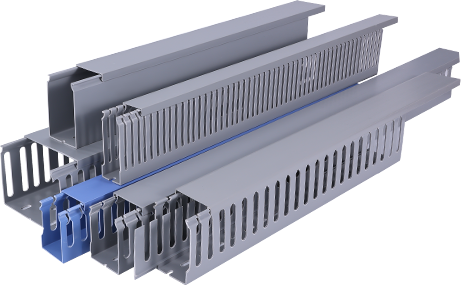
Whether you are cleaning up messy cables in a home office, organizing wiring in a commercial workspace, or completing a new construction wiring project, PVC wire duct is one of the most practical, affordable, and durable solutions for cable management. This tutorial will walk you through everything you need to know, from selecting the right materials to completing a neat, long-lasting installation, even if you have no prior construction or electrical experience. PVC wire duct, also called PVC cable trunking, is a hollow plastic channel designed to encase and protect electrical wires, data cables, and communication lines while keeping them organized and hidden from view. Unlike metal alternatives, PVC is lightweight, resistant to moisture and corrosion, non-conductive for extra electrical safety, and easy to cut and modify on-site, making it ideal for both DIY enthusiasts and professional electricians.
First, you need to prepare the right tools and materials before starting your installation. For materials, you will need PVC wire duct in the correct size for your cable load – measure the total diameter of all cables you plan to encase, and choose a duct that is 20 to 30 percent larger than your total measurement to leave room for future cable additions. You will also need matching PVC duct covers, wall or ceiling anchors, screws, PVC adhesive (if connecting multiple duct sections), and a tape measure for marking positions. For tools, gather a pencil for marking cut lines, a fine-tooth saw or PVC cutter for trimming the duct to size, a level to ensure straight alignment, a drill for making anchor holes, and a sanding block to smooth rough cut edges. It is also a good idea to wear safety goggles and work gloves to protect your eyes and hands from plastic shavings during cutting.
Next, you need to plan your wiring route and mark your installation lines. Before you make any cuts or drill any holes, map out the path you want the duct to follow. Most installations run along baseboards, ceiling edges, or wall studs to keep the duct out of the way and visually unobtrusive. Check for hidden wires or pipes in the wall using a stud finder with wire detection capability to avoid accidental damage during drilling. Once you have confirmed the route is clear, use your pencil and level to draw a straight guide line along the wall or ceiling. Mark the positions of each anchor hole, spacing them 12 to 18 inches apart for small duct, or 24 inches apart for larger, heavier ducts that hold many cables. If you need to turn a corner, you can either cut 45-degree ends on two duct sections to create a clean mitered corner, or purchase pre-molded PVC elbow fittings for a faster, more professional finish.
After marking your route, you can cut the PVC wire duct to the required lengths and prepare the pieces for installation. Measure the distance between your start and end points, then mark the cut line on the duct body. If you are using a fine-tooth hand saw, clamp the duct to a workbench to keep it steady while cutting, which will prevent uneven cuts and splintering. If you have a dedicated PVC cutter, you will get a cleaner, straighter cut with less effort. Once you have cut the piece to size, use your sanding block to smooth the cut edge, removing any sharp burrs or plastic shavings that could damage cable insulation. If you are joining two straight sections of duct together, apply a thin layer of PVC adhesive to the end of one piece, slide it into a coupling fitting, and hold it in place for 30 seconds to let the adhesive set. Wait 2 to 3 minutes for the adhesive to cure fully before moving on to installation.
Then, you can mount the duct body and organize your cables. Hold the marked duct body up to your guide line on the wall, then drill pilot holes through the marked anchor positions and insert the wall anchors if you are mounting into drywall. Screw the duct body firmly to the wall, making sure it stays aligned with your level guide. Once all duct sections are mounted, gather all your cables and lay them neatly inside the duct body. Try to separate power cables from data cables if possible to reduce electrical interference that can affect internet or audio signal quality. Leave a little slack in cables near connection points to make future repairs or replacements easier, and avoid overpacking the duct, as this can make it hard to fit the cover on and trap excess heat around power cables.
Finally, you can secure the cover and finish your installation. Most PVC wire duct covers snap into place easily with gentle pressure, so simply align the cover with the grooves on the sides of the duct body and press along the entire length until you hear it click into place. If any section feels loose, you can add a small dot of adhesive to hold it in place, but avoid using too much adhesive, as this will make it hard to remove the cover later if you need to add or move cables. Wipe away any pencil marks or plastic shavings with a clean cloth, and check all connections to make sure everything is secure.
By following these simple steps, you can complete a professional-looking PVC wire duct installation that will keep your cables organized and protected for decades. This project only takes a few hours for most small to medium installations, and the result is a much cleaner, safer workspace than leaving cables exposed along walls. Always remember to turn off power to any electrical wires you are working with before starting the project to avoid electrical hazards, and double-check your measurements before cutting to avoid wasting materials.