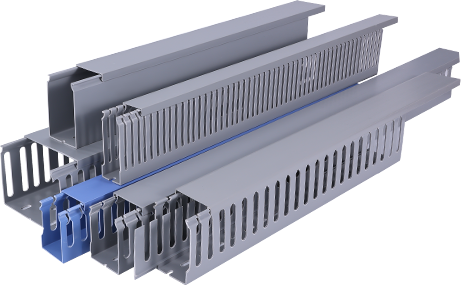
If you’ve ever tripped over loose cables along a baseboard or struggled to tidy up a messy cluster of wires behind your desk, a PVC cable raceway is the affordable, easy solution you’ve been looking for. PVC cable raceways are rigid plastic channels designed to hide and protect electrical wires, data cables, and HDMI cords, keeping spaces organized while reducing tripping hazards and protecting cables from damage. Unlike more invasive wiring solutions like running cables through drywall, installing PVC raceway requires no major construction experience or specialized tools, making it ideal for DIY beginners. This tutorial will walk you through every step of planning, prepping, and installing a PVC cable raceway to get a clean, professional-looking result in just a few hours.
First, before you pick up a drill or a strip of adhesive, you need to plan your cable route and gather the right materials. Start by mapping out the path your cables will take from your device to your power outlet or wall jack. For most projects, this means running the raceway along baseboards, up the side of a wall, or across the edge of a ceiling—choose a route that follows existing architectural lines to keep the raceway as hidden as possible. Next, count how many cables you need to hide, because this will determine what size raceway you need. Most PVC raceways come in sizes ranging from ½ inch to 2 inches wide; a ½-inch raceway works for 2 to 3 small cords like phone chargers or HDMI cables, while a 2-inch raceway can hold up to 10 thick power cables. After choosing the right size, gather all your materials: your PVC raceway kit (which usually includes pre-cut channels, cover strips, mounting brackets, and end caps), a measuring tape, a pencil, a hacksaw or PVC cutter, a level, sandpaper, and either a screwdriver or strong double-sided adhesive (many kits include adhesive backing already). Don’t forget to turn off power to any nearby outlets if you’re working with electrical cables, for basic safety.
Secondly, prepare your work surface and cut the raceway to fit your planned route. Start by cleaning the wall or baseboard where you will mount the raceway with a mild degreaser and a cloth; any dust, grease, or loose paint will prevent adhesive from sticking properly, so this step is easy to skip but critical for long-term hold. Once the surface is dry, measure your planned route with the measuring tape, and mark the length on the PVC channel with a pencil. Use a hacksaw or PVC cutter to cut the channel to size, then sand the cut edge lightly to remove any burrs that could damage your cables or make it hard to snap the cover on. If your route turns a corner, most manufacturers sell pre-made 90-degree PVC corner pieces that fit your raceway size, so you don’t have to cut awkward angles yourself. If you don’t have a pre-made corner, you can cut two ends of the channel at 45-degree angles to fit together neatly, but pre-made pieces will give you a much cleaner finish.
Additionally, it’s time to mount the base channel and add your cables. Start by holding the cut channel up to your marked route, and use the level to make sure it is straight—even a slight crooked line will stand out against a wall, so take a minute to adjust it before securing it. If your raceway has adhesive backing, simply peel off the backing paper and press the channel firmly against the wall for 30 to 60 seconds to ensure a strong bond. If you’re mounting on a textured wall or need extra hold, use the included screws and mounting brackets to secure the channel to the wall studs. Once the channel is secured, place all your cables inside the channel, leaving a little extra slack at each end to avoid putting tension on the cable connections. Don’t overstuff the channel—if your cables don’t fit comfortably without bulging, you need a larger raceway; overstuffing can make it hard to close the cover and trap heat around electrical wires, which creates a minor fire hazard.
Furthermore, finish the installation by adding covers, end caps, and any necessary connectors. Once your cables are neatly arranged inside the base channel, simply snap the PVC cover onto the base starting from one end and working your way to the other. Most PVC raceways have a snap-fit design that doesn’t require any adhesive or screws, so this step takes less than a minute. Add end caps to both open ends of the raceway to cover the cut edges and keep dust from getting inside the channel. If you connected multiple pieces of raceway to cover a longer route, use the included joint connectors to cover the gap between two pieces for a seamless look. Once everything is in place, plug your cables back in and test your devices to make sure nothing came loose during installation.
Finally, a few maintenance tips will help your PVC cable raceway last for years. PVC is moisture-resistant and durable, so you can wipe it down with a damp cloth when you clean your space to keep it looking new. If you ever need to add or remove a cable, just pry the cover off gently with a flathead screwdriver, make your changes, and snap the cover back on—this is one of the biggest advantages of PVC raceway over permanent wiring solutions, as it lets you adjust your cable setup any time you need to. For outdoor installations, make sure you choose a UV-resistant PVC raceway, as standard PVC will break down over time when exposed to direct sunlight.
Installing a PVC cable raceway is one of the simplest DIY organization projects you can tackle, and it makes a huge difference in the look and safety of any home or office space. By following these simple steps, you can turn a messy tangle of loose cables into a clean, organized setup in less than an afternoon, no professional help required. Whether you’re tidying up behind your home entertainment center, organizing cables in a home office, or running a new data line to a different room, PVC cable raceway is an affordable, flexible solution that delivers professional results for beginners.