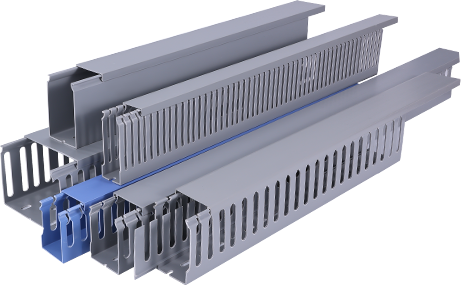
Whether you are renovating your home, setting up a new office, or simply tidying up messy electrical and data wires, PVC cable trunking is one of the most affordable, accessible, and practical solutions to keep cables organized and protected. Unlike metal trunking, PVC is lightweight, non-conductive, rust-resistant, and easy to cut and shape, making it an ideal choice for DIY enthusiasts who want to complete a neat wiring project without hiring a professional electrician. This tutorial will walk you through every critical step of planning, preparing, and installing PVC cable trunking, helping you achieve a clean, safe, and long-lasting result even if you have no prior experience with wiring projects.
First, proper preparation and planning are the foundation of a successful PVC cable trunking installation. Before you purchase any materials, you need to map out the route of your cables. Start by identifying all the cables you need to cover, from power cords and HDMI cables to data network wires, and mark the path on your wall or skirting board with a pencil. Consider the location of outlets and endpoints to avoid unnecessary bends that can complicate cable pulling later. Next, calculate the size of trunking you need: PVC cable trunking comes in a range of widths and depths, and you should choose a size that leaves 20 to 25 percent extra space for future cable additions. If you cram too many wires into a small trunking, you may struggle to close the cover and risk overheating for power cables. Finally, gather all the necessary tools and materials, including the PVC trunking pieces, corner connectors, end caps, adhesive or mounting clips, a measuring tape, a fine-tooth saw or PVC cutter, a pencil, a drill (if you are mounting on solid walls), sandpaper, and a level to ensure your trunking is straight.
Secondly, cutting and fitting the PVC trunking to your planned route is the next critical step. Once your route is marked and measured, cut the trunking base to the required length one piece at a time. If you are using a fine-tooth saw, secure the trunking in a clamp to prevent it from slipping, and cut slowly to avoid cracking the PVC. After cutting, use sandpaper to smooth down the rough edges; this step prevents sharp edges from damaging cable insulation and ensures a tight fit with connectors. For corners, you can either use pre-made 90-degree internal or external connectors, or cut a 45-degree miter joint on two trunking pieces to create a custom corner for a neater finish. If you choose the custom method, test fit the two cut pieces together before mounting to make sure the joint aligns smoothly. Always dry fit all trunking pieces along your marked route before attaching anything to the wall, this allows you to adjust sizes and positions without making permanent mistakes that require re-cutting new pieces.
Third, mounting the trunking base and running your cables is where your project starts to take shape. Start from one end of your route, and work your way towards the other end. If you are mounting the trunking on drywall or wooden surfaces, you can use strong double-sided adhesive for a no-drill solution that leaves minimal damage to walls, this works perfectly for lightweight trunking with low-voltage cables like data or AV wires. For heavier trunking with high-voltage power cables, or mounting on concrete or brick walls, use screws and mounting clips for a more secure hold. Use your level to check that the trunking is straight after mounting every 2 to 3 pieces, a crooked trunking line will stand out and ruin the neat look you are aiming for. Once all the base pieces are securely mounted, you can start running your cables through the trunking. Group similar cables together if needed, and leave a small amount of slack at each end near outlets to make future adjustments or repairs easier. Avoid pulling cables too tight, as this can put stress on connectors and insulation over time.
Additionally, finishing the installation and performing a safety check ensures your project is safe and long-lasting. After all cables are run, snap the PVC cover onto the base of the trunking, starting from one end and working your way along the route to ensure it clicks securely into place. Install end caps at any open ends of the trunking to cover sharp edges and prevent dust from accumulating inside. Wipe down the trunking with a damp cloth to remove any pencil marks or sawdust, and step back to check that all joints are aligned and the entire run looks neat. Most importantly, perform a full safety check before you use any of the connected devices. For power cables, turn off the main power supply during the entire installation process, and once everything is finished, turn the power back on and test each outlet to make sure there are no loose connections or short circuits. For low-voltage data cables, test the connection speed and continuity with a network tester to confirm everything works as expected.
Finally, regular minor maintenance will keep your PVC cable trunking in good condition for years. PVC is a low-maintenance material, but you should check the trunking annually to make sure it is still securely mounted, and that no cables have become loose or damaged. If you need to add new cables later, simply pop off the cover, add the new wires, and snap the cover back on, which is one of the biggest advantages of PVC cable trunking over hidden in-wall wiring. By following this step-by-step tutorial, even beginners can complete a professional-looking PVC cable trunking installation that keeps your space tidy, protects your cables from damage, and eliminates the safety hazards of loose wires lying around.